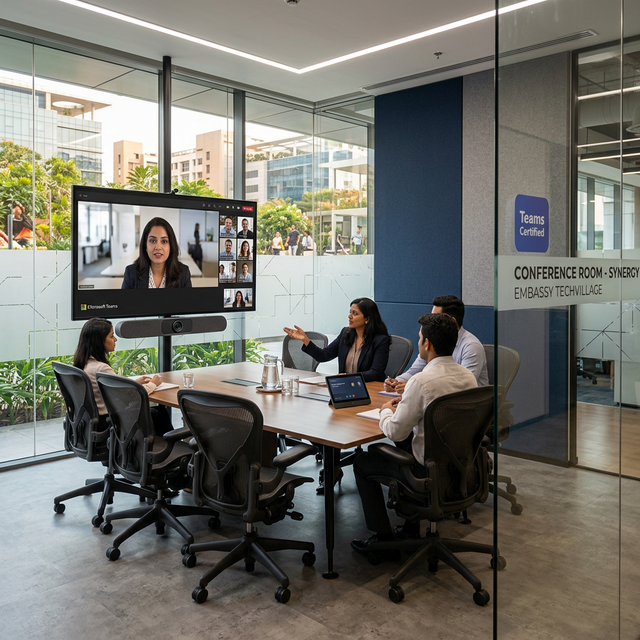
Hybrid work has permanently changed how Bangalore businesses conduct meetings. Whether your team is in the Electronic City office or distributed across Whitefield, Pune, and Singapore, the conference room has become a high-stakes communications hub. The two dominant platforms for purpose-built conference rooms are Microsoft Teams Rooms (MTR) and Zoom Rooms — and choosing wisely determines whether your meetings are seamless or frustrating. This guide provides an expert AV integrator's perspective based on Synchronos Solutions' deployments across dozens of Bangalore corporate offices.
Why Purpose-Built Conference Rooms Matter
A laptop on a desk with a Bluetooth speaker is not a conference room. Common problems in makeshift setups:
- Inconsistent audio: External participants can't hear clearly; echo and background noise persist.
- Poor video: Low-resolution webcams, bad lighting, and unflattering angles undermine professional presence.
- Friction: "Can you share the invite again? I can't join" wastes 5–10 minutes per meeting.
- Scalability: You can't add participants or screen-share smoothly without dedicated hardware.
Purpose-built MTR or Zoom Room systems eliminate all of these problems with one-touch meeting join, professional-grade audio and camera, and wireless content sharing.
Microsoft Teams Rooms (MTR)
What It Is
Microsoft Teams Rooms runs on dedicated hardware (a Windows-based or Android compute unit) connected to room peripherals — cameras, microphones, and displays — creating a certified Teams meeting experience. The system joins meetings with a single tap from the room controller.
MTR Strengths
- Deep Microsoft 365 integration: Calendar sync, room booking, and Teams-native experience. If your organisation is on M365, MTR is a natural extension.
- Intelligent camera features: AI auto-framing (Face Camp, Jabra PanaCast 50, Logitech Rally Bar) tracks speakers around the table.
- Front Row layout: Horizontal strip showing remote participants at eye level alongside content — significantly more natural for hybrid meetings.
- Certified hardware ecosystem: Logitech, Poly (HP), Yealink, Crestron, and Biamp all produce certified MTR bundles.
- Copilot integration: Azure AI Copilot provides meeting transcription, real-time translation, and AI-summarised action items.
MTR Limitations
- Guest participants on non-Teams platforms (Google Meet, Zoom) join as guests — no native experience.
- Requires Microsoft Teams licensing — typically M365 Business or Enterprise plans.
- Less flexible than Zoom for large events or webinar-style broadcasts.
Zoom Rooms
What It Is
Zoom Rooms converts any room into a Zoom-native conference space using a dedicated appliance running Zoom Rooms software, connected to cameras, microphones, and displays. The room appears in the Zoom portal like a physical attendee and can be joined with one touch.
Zoom Rooms Strengths
- Platform-agnostic participants: Any external guest with a Zoom account can join seamlessly.
- Reliability: Zoom's cloud infrastructure is well-proven and highly reliable.
- Zoom Whiteboard: Real-time collaborative whiteboard that works across devices.
- Smart Gallery: Individually frames each in-room participant for remote participants — the most equitable hybrid experience.
- Lower per-room cost: Zoom Rooms subscription is typically less expensive than MTR licensing for organisations not already on M365.
Zoom Rooms Limitations
- No native Microsoft 365 calendar sync without additional setup.
- AI features (Zoom AI Companion transcription, summaries) are improving but lag behind Teams Copilot for enterprise use cases.
Hardware Recommendations
Entry-Level Meeting Room (6 persons, ₹4–8 lakh installed)
- Display: 75" Samsung QLED commercial display
- Camera: Logitech Rally Camera (ePTZ, Teams/Zoom certified)
- Audio: Poly Studio X50 soundbar (all-in-one, no separate compute)
- Controller: Logitech Tap (10" touch panel)
Boardroom (20 persons, ₹15–30 lakh installed)
- Displays: Dual 85" Samsung QM85B commercial series
- Camera: Jabra PanaCast 50 (AI auto-framing, 180° room view)
- Audio: Biamp Tesira conference audio system with beamforming ceiling microphone array
- Control: Crestron 10" TSW touch panel with room scheduling display outside door
- Wireless content sharing: BarcoClick Share Pro
The Synchronos AV Design Process
Boardroom AV is not a commodity. Synchronos follows a rigorous design process:
- Room acoustics assessment: Measuring RT60, background noise levels, and identifying reflective surfaces before selecting microphone arrays.
- Camera placement engineering: Ensuring every seat is within the camera's optimal AFOV (Adaptive Field of View) without perspective distortion.
- Signal distribution design: Structuring video routing so any source reaches any display with zero latency.
- Control room programming: Crestron or Control4 automation so the entire room (lights, blinds, AV, VC) activates with one button press.
- User training: 30-minute training session for all staff — technology only succeeds if people actually use it.
FAQ
Which is better — Teams Rooms or Zoom Rooms?
Teams Rooms if your organisation is Microsoft-centric (M365, Azure AD, SharePoint). Zoom Rooms if you frequently host external guests, work across multiple VC platforms, or prefer Zoom's simplicity. Both can be installed alongside each other in hybrid environments.
Can one room support both Teams and Zoom?
Yes — modern room systems like the Poly Studio X70 support multi-tenant (Teams + Zoom) on certified hardware. Synchronos has implemented dual-platform rooms for several Bangalore clients with international partner requirements.
How long does a conference room AV installation take?
Entry-level meeting room: 1–2 days. Full boardroom: 5–10 days including acoustic treatment, wall mounting, cable concealment, and commissioning.

